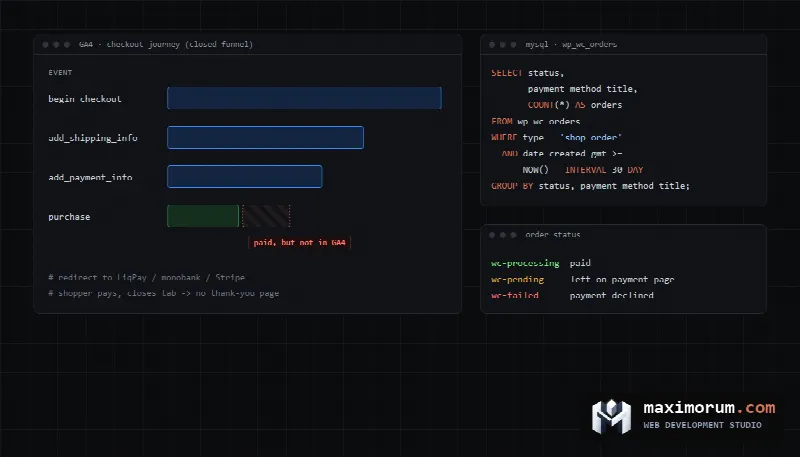
GA4 will tell you that only a fraction of shoppers who start checkout end up buying. It will not tell you which step loses them, and part of that loss is not real. A customer who pays on a PayPal or Stripe page and closes the tab never fires a purchase event, so the sale looks like an abandoned checkout. This guide shows how to set up a WooCommerce checkout funnel in GA4, reconcile it against your order database, and separate real drop-off from measurement gaps.
How many shoppers abandon checkout on average
Baymard Institute averages 50 studies published from 2006 to 2025 and arrives at a cart abandonment rate of 70.22%, with individual studies ranging from 55% to 84% (Baymard, Cart Abandonment Rate). In Baymard's survey, 42% of US shoppers had abandoned a cart because they were just browsing. Among the rest, the most common reasons were:
- extra costs for shipping, tax or fees were too high (40%);
- delivery was too slow (20%);
- they did not trust the site with their card details (19%);
- the site wanted them to create an account (18%);
- checkout was too long or complicated (17%);
- the website had errors or crashed (17%);
- the card was declined (10%).
Treat this list as hypotheses. A funnel broken down by step shows which of them applies to your store.
The events your store has to send
GA4 has a built-in Checkout journey report under Life cycle, then Monetization. If it is missing from the menu, a property admin or editor can add it from the Library. It is built from four events (Google Analytics Help):
| Step | GA4 event | When WooCommerce fires it |
|---|---|---|
| Begin checkout | begin_checkout | The checkout page loads |
| Add shipping | add_shipping_info | The shopper picks a shipping method |
| Add payment | add_payment_info | The shopper picks a payment method |
| Purchase | purchase | The order received page loads |
The report uses a closed funnel, so it only counts users who entered at the first step. Without the two middle events, everything between begin_checkout and purchase collapses into one unexplained drop.
The official Google Analytics for WooCommerce extension only started sending add_shipping_info and add_payment_info in version 2.2.0, released in June 2026, and the current 2.4.4 requires WooCommerce 11.1 or later (extension changelog). A store that has not updated WooCommerce in a while does not get those events, and neither does a GTM setup that was only ever configured for purchases.
Checking takes five minutes. Open Google Tag Assistant, enter your store URL and go through checkout up to the payment step. You should see begin_checkout, add_shipping_info and add_payment_info, plus purchase after a test order.
Why purchases go missing at the payment step
The biggest drop usually sits between add_payment_info and purchase, and that is where most measurement errors live. The extension records a purchase only when the shopper lands back on the thank-you page. WooCommerce's documentation says purchase tracking requires a payment gateway that redirects to the order received page after payment (Google Analytics for WooCommerce).
Hosted payment pages such as Stripe Checkout or PayPal confirm payment to your server separately from the customer's redirect. The order is marked paid by that server-side notification, while the GA4 event depends on the browser coming back. Stripe's own documentation warns that a customer can pay successfully and lose their connection before the landing page loads, so you cannot rely on the customer visiting it (Stripe Docs).
Three more sources of mismatch:
- GA4 treats the return from the payment domain as a new visit from paypal.com or checkout.stripe.com, and the sale gets credited to the payment provider instead of your ad campaign. Add those domains to the unwanted referrals list. Google uses third-party payment processors as the main example for this setting (GA4 Help).
- Before version 2.4.4, the extension sent
purchasefor failed and cancelled orders too, so GA4 counted sales that never happened. - Since 2.4.1, the extension reports purchase value as item prices times quantity, excluding tax and shipping. GA4 revenue will be lower than order totals in WooCommerce, and that is expected.
Reconcile the funnel with your order database
The database has the final word. Stores installed on WooCommerce 8.2 or later keep orders in the wc_orders table by default (HPOS documentation). This query groups the last 30 days of orders by status and payment method. Replace the wp_ prefix with yours:
SELECT status,
       payment_method_title,
       COUNT(*)                 AS orders,
       ROUND(SUM(total_amount)) AS amount
FROM wp_wc_orders
WHERE type = 'shop_order'
  AND status <> 'wc-checkout-draft'
  AND date_created_gmt >= NOW() - INTERVAL 30 DAY
GROUP BY status, payment_method_title
ORDER BY payment_method_title, orders DESC;
For an online payment method, wc-pending (Pending payment) means the shopper filled in the form, clicked Place order, reached the payment page and did not pay. That is real loss at the payment step, and some of those orders can be recovered with a follow-up email. wc-failed means the payment was declined. If one method collects most of the failures, look at the gateway configuration or 3-D Secure before touching the page design. The query skips block checkout drafts with the wc-checkout-draft status.
Then compare paid orders with GA4 purchases. In Explore, build a free-form table with the Transaction ID dimension for the same date range and export it as CSV. The extension sends the order number as transaction_id, which matches the order ID unless you run a custom numbering plugin. Export paid orders (wc-processing and wc-completed) from the database as CSV with id and payment_method_title columns. This script shows how many paid orders per payment method never reached GA4:
import csv, sys
from collections import Counter

# python compare.py orders.csv ga4_transactions.csv
ga4 = set()
with open(sys.argv[2], encoding='utf-8-sig') as f:
    for row in csv.reader(f):
        if row and row[0].strip().isdigit():
            ga4.add(row[0].strip())

total, missing = Counter(), Counter()
with open(sys.argv[1], encoding='utf-8-sig') as f:
    for row in csv.DictReader(f):
        method = row['payment_method_title']
        total[method] += 1
        if row['id'] not in ga4:
            missing[method] += 1

for method, n in total.most_common():
    print(f'{method:30} paid {n:5}  not in GA4 {missing[method]:5}  ({missing[method] / n:.0%})')
If on-site card payments show up almost in full while a redirect-based method loses a noticeable share, the cause is the return trip from the payment page. In that case the drop between add_payment_info and purchase is overstated, and redesigning checkout because of it would be wasted effort.
To record every purchase regardless of the redirect, send it from the server when the payment webhook arrives. That is what the Measurement Protocol is for. Google describes it as a supplement to on-site tagging, and it joins server events to the visit through client_id (Measurement Protocol docs). The store saves the shopper's client_id from the cookie on the order at checkout, and the webhook handler sends purchase with the same transaction_id. GA4 deduplicates purchases that share a transaction ID (GA4 Help), so nothing is counted twice if the shopper does come back to the thank-you page.
We recommend handing this part to a developer, because a bug in the webhook handler can corrupt payment records as well as reports. If your WooCommerce numbers and GA4 never match, we can set up server-side purchase tracking so the funnel shows real losses.
Build your own funnel with breakdowns
The built-in report cannot be split by device or payment method. In GA4, open Explore, then Funnel exploration, and set it up like this:
- Add the steps
add_to_cart,begin_checkout,add_shipping_info,add_payment_infoandpurchase, in that order. - Keep the funnel closed so it only counts users who went through the steps in order. An open funnel helps when some shoppers enter checkout through a Buy now button and skip the cart (funnel exploration help).
- Set the breakdown to Device category. A gap between mobile and desktop at the shipping step usually points to a form that is hard to use on a phone.
- Save a copy broken down by the
payment_typeparameter ofadd_payment_info. Register it as a custom dimension in property settings first, or it will not appear in the breakdown list.
What a drop at each step usually means
| Where it drops | Likely cause | What to check |
|---|---|---|
| Cart to begin checkout | Unexpected costs, forced account creation | Whether shipping cost is visible before checkout; whether guest checkout is enabled |
| Begin checkout to shipping | Long form, address entry that is painful on mobile | Number of fields; address autocomplete on a phone |
| Shipping to payment | Shipping price or delivery time came as a surprise | How the order total changes after a shipping method is picked |
| Payment to purchase | Declined payment, gateway error, or the purchase never reached GA4 | wc-pending and wc-failed orders in the database, reconciliation against GA4 transactions |
Common mistakes
- Drawing conclusions from a funnel that has no events between begin checkout and purchase.
- Leaving payment domains out of unwanted referrals and treating PayPal as a traffic source.
- Comparing GA4 revenue with WooCommerce order totals without accounting for excluded shipping and tax.
- Redesigning checkout when a large part of the payment-step "loss" is purchases that never reached analytics.
- Running ecommerce tags in GTM alongside the extension. GA4 drops duplicate purchases by
transaction_id, butadd_to_cartandbegin_checkoutget counted twice and the funnel proportions shift.
Once you have confirmed where shoppers really leave, the fix is engineering work. For webhook handling that does not create duplicate orders, read our guide to idempotent payment webhooks, and for mobile checkout speed, see Core Web Vitals for WooCommerce stores.
FAQ
Why does GA4 show fewer purchases than WooCommerce?
Most often the customer paid on the payment provider's page and never came back to the thank-you page. Ad blockers and orders entered manually by staff add to the gap. Match GA4 transaction IDs against database orders to see which payment method loses events.
What is a normal cart abandonment rate?
Baymard puts the average at 70.22% across 50 studies, with a range of 55% to 84%. Your own trend after each checkout change is a more useful benchmark.
Do I need Google Tag Manager if I use the Google Analytics for WooCommerce extension?
Version 2.2.0 or later covers the basic checkout funnel. GTM is worth adding when you want extra events, such as form validation errors, or when ad tags need to fire on the same events.
Can I track purchases if the customer never returns to my site?
Yes, by sending the purchase from your server through the Measurement Protocol when the payment webhook arrives. Use the same transaction_id and the shopper's client_id, and GA4 will attach it to the visit without double counting.
Get your checkout and analytics reviewed
Send us your store URL. We will go through checkout on mobile and desktop, check which events actually reach GA4, and tell you which step loses real customers and where you are looking at a measurement gap. GA4 and Tag Manager setup is listed as a $290 add-on on our pricing page.
For store improvements and new builds, see online stores. Reach us through the contact form or on Telegram.