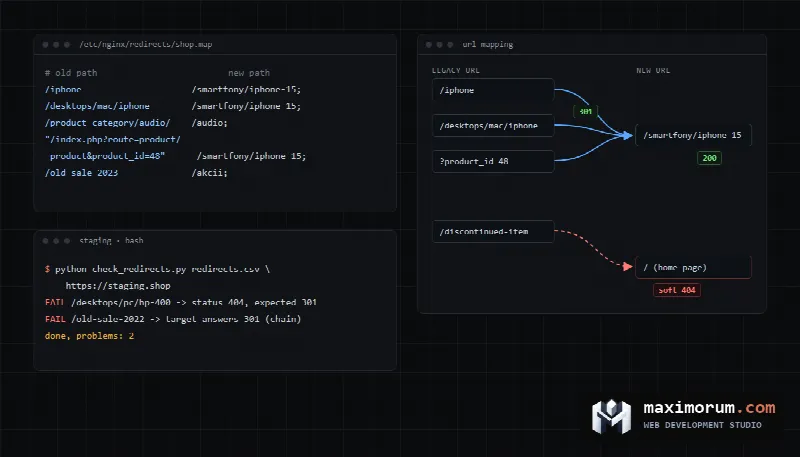
When a store loses organic traffic after a replatform, the cause is rarely the new platform itself. It is usually old URLs that Google has known for years and that now return 404 or all point at the homepage. This guide shows how to pull every legacy URL out of your current store, turn them into a redirect map, deploy it on the server or in Shopify, and test it with a script before launch day.
What actually happens to rankings during a migration
Google moves signals from each old URL to its new one individually, once Googlebot has crawled both. Google's guide How to move a site says a medium-sized site can take a few weeks or more before the new URLs replace the old ones in results, and larger sites take longer. The same page states that 301 and other permanent redirects do not cause a loss in PageRank.
Some ranking movement during that window is normal. A drop that does not recover almost always has a technical cause you can find on staging:
- part of the product and category URLs never made it into the map and now return 404;
- discontinued products all redirect to the homepage, which Google may treat as a soft 404;
- redirects chain through intermediate URLs left over from an earlier migration;
- the staging
noindextag orDisallow: /in robots.txt went live with the new site; - the redirects are 302s or JavaScript instead of 301s.
Step 1. Build a complete list of legacy URLs
No single source has every URL. Your sitemap lists what the platform considers current, and it misses old product URLs that still have backlinks. Pull from four places and merge them into one deduplicated sheet.
- The current sitemap.xml. Save a copy before the old store goes offline.
- Search Console, Performance report, Pages tab, last 16 months. The UI export stops at 1,000 rows, while the Search Analytics API returns up to 50,000 rows per day per site (Google Search Central Blog). A catalog with thousands of SKUs needs the API or the Looker Studio connector. Export the Links report too, so you know which pages carry backlinks.
- Web server logs covering several months, including your seasonal peak.
- The platform database, which holds every product, including ones that are out of stock or hidden.
With nginx or Apache writing the standard combined log format, one command lists every path that returned 200:
zcat -f /var/log/nginx/access.log* \
  | awk '$9 == 200 {print $7}' \
  | sort | uniq -c | sort -rn > old_urls.txt
Include images and PDFs. Google's guide asks you to move embedded files the same way as pages, and product images get their own search traffic.
Where WooCommerce and OpenCart keep their URLs
WooCommerce defaults to /product/product-name/ for products and /product-category/name/ for categories (WooCommerce docs). If someone changed the bases under Settings, then Permalinks, write down the current values before you start.
OpenCart 3 stores friendly URLs in the oc_seo_url table, where query holds values like product_id=48 and keyword holds the slug. This query returns every product with its legacy path, falling back to the index.php?route= form for products that never had a slug:
SELECT p.product_id,
       pd.name,
       COALESCE(CONCAT('/', su.keyword),
                CONCAT('/index.php?route=product/product&product_id=', p.product_id)) AS old_path
FROM oc_product p
JOIN oc_product_description pd
  ON pd.product_id = p.product_id AND pd.language_id = 1
LEFT JOIN oc_seo_url su
  ON su.query = CONCAT('product_id=', p.product_id)
 AND su.store_id = 0 AND su.language_id = 1;
OpenCart's URL rewriter (catalog/controller/startup/seo_url.php) also prefixes product URLs with the category path when a shopper arrives from a category. The same product answers at /iphone and at /desktops/mac/iphone. The canonical tag points to the short form, but logs and backlinks contain both, so the long variants need redirects as well. OpenCart 4 replaced the query column with key and value, so the join becomes su.key = 'product_id' AND su.value = p.product_id.
Step 2. Build the redirect map
The map is a two-column sheet, old_path,new_path, one row per legacy URL. Sort it by Search Console clicks so the pages that bring the most traffic sit at the top, and review those rows by hand.
| Old page | Redirect to | Avoid |
|---|---|---|
| Product that exists on the new site | 301 to the same product | Sending it to a category or search page |
| Discontinued product | 301 to the successor model or closest category; with no relevant match, return 404 or 410 | Bulk redirects to the homepage |
| Category | 301 to the matching category | Merging unrelated categories into one |
| Several pages merged into one | 301 to the new consolidated page | Leaving the old URLs live with duplicate copy |
| Filter, sort and pagination URLs | The new equivalent, if it exists and is indexable | Copying thousands of parameter URLs into the map |
The homepage rule comes from Google's documentation. Redirecting many old URLs to one irrelevant page confuses users and may be treated as a soft 404. For content you removed, Google recommends a 404 or 410.
If the store has been migrated before, take the existing redirects and point them straight at the final URLs. Otherwise you build a chain from the oldest URL through the previous one to the new page.
Matching is where most of the hours go. A catalog with tens of thousands of SKUs, several languages and custom filter modules needs scripted matching by SKU plus spot checks. We do this before launch, so the map is already tested when DNS switches. If you are planning a store rebuild or replatform, send us the store URL and the target platform and we will estimate the size of the map.
Step 3. Deploy redirects on the server
Google recommends server-side permanent redirects, 301 or 308 (Redirects and Google Search). Googlebot only sees a JavaScript redirect after rendering, and rendering can fail. For thousands of URLs on nginx, the map module with a separate file works well:
# http block
map_hash_max_size 262144;
map_hash_bucket_size 256;

map $request_uri $redirect_to {
    default "";
    include /etc/nginx/redirects/shop.map;
}

# server block of the new site
if ($redirect_to) {
    return 301 $redirect_to;
}
The shop.map file has one line per URL:
/iphone                     /phones/apple-iphone-15;
/desktops/mac/iphone        /phones/apple-iphone-15;
"/index.php?route=product/product&product_id=48"  /phones/apple-iphone-15;
A few details that trip people up:
$request_uriholds the path plus query string exactly as the browser sent it. Non-ASCII slugs arrive percent-encoded, so encode them the same way in the map.- According to the nginx docs, map strings match case-insensitively and
map_hash_max_sizedefaults to 2048. A large map will fail the config test until you raise the hash size, which is why the values above are generous. - On a Laravel or WordPress build without nginx access, keep the map in a database table and return the 301 from middleware or a plugin. It has to be a real HTTP 301, not a page with a script.
Moving to Shopify
Shopify handles redirects in the admin under Content, then Menus, then URL redirects, with CSV import. Its help page lists the limits worth knowing before you build the map:
- a redirect only fires when the old URL returns 404 on Shopify, so a live page at that path blocks it;
- fixed paths such as
/products,/collectionsand/collections/all, and prefixes like/cartand/apps, cannot be redirected; - URLs with query strings may not redirect as expected, which matters for OpenCart's
index.php?route=URLs; - the cap is 100,000 redirects, or 20,000,000 on Shopify Plus.
Google advises keeping redirects in place as long as possible, generally at least one year. For shoppers with old bookmarks, keeping them permanently is the better choice.
Step 4. Test the map with a script before launch
Deploy the new site on a staging domain with the same redirect rules and run the whole map against it. This Python script checks that each old URL returns 301 or 308, points exactly where the map says, and that the target answers 200 with no further hop:
import csv, sys
import requests

# python check_redirects.py redirects.csv https://staging.example.com
base = sys.argv[2].rstrip('/')
bad = 0
with open(sys.argv[1], encoding='utf-8-sig') as f:
    for row in csv.DictReader(f):
        old, expected = row['old_path'], base + row['new_path']
        r = requests.get(base + old, allow_redirects=False, timeout=15)
        loc = requests.compat.urljoin(base + old, r.headers.get('Location', ''))
        problem = None
        if r.status_code not in (301, 308):
            problem = f'status {r.status_code}, expected 301'
        elif loc != expected:
            problem = f'leads to {loc}'
        else:
            final = requests.get(loc, allow_redirects=False, timeout=15)
            if final.status_code != 200:
                problem = f'target answers {final.status_code} (chain or error)'
        if problem:
            bad += 1
            print(f'FAIL {old} -> {problem}')
print(f'done, problems: {bad}')
sys.exit(1 if bad else 0)
It catches 404s, 302s, chains and redirects to the wrong page. Rerun it after every edit to the map until it reports zero problems. While you are on staging, confirm self-referencing canonicals, hreflang on language versions, no stray noindex, and the robots.txt you intend to ship.
The first 30 days after launch
- Submit the new sitemap in Search Console and keep the old one. Google suggests watching indexed URLs in the old sitemap fall toward zero while the new one rises.
- Check 404s in the logs every day and add missing URLs to the map:
awk '$9 == 404 {print $7}' /var/log/nginx/access.log \ | sort | uniq -c | sort -rn | head -50 - Update internal links, ad campaigns, Google Merchant Center and marketplace feeds, so shoppers skip the redirect hop.
- Compare clicks on your top pages against the baseline you saved before the move. A page that drops much more than the rest usually has a redirect or content problem.
The Change of Address tool in Search Console is only for moving to a new domain or subdomain. A new platform on the same domain does not use it.
Common mistakes
- Building the map from the sitemap alone and missing old URLs that hold backlinks.
- Redirecting every discontinued product to the homepage.
- Shipping 302s "for now" and never switching them to 301.
- Changing platform, catalog structure, domain and design at once. Google recommends one change at a time, which also makes it possible to tell what caused a drop.
- Deleting redirects a few months later because "everything is indexed now".
- Forgetting OpenCart's category-prefixed product URLs.
If you are still deciding whether to move at all, read when an OpenCart store is ready for a custom Laravel platform. For the checks we run on a new site before it goes live, see our pre-launch technical SEO audit.
FAQ
Do 301 redirects lose rankings?
Google's documentation says 301 and 308 redirects do not cause a loss in PageRank. Rankings can fluctuate while Googlebot recrawls the old and new URLs, which takes a few weeks for a medium-sized site.
How long should I keep redirects after a migration?
Google recommends at least one year. We advise keeping them indefinitely. Backlinks and bookmarks last for years, and an nginx map answers those requests without touching PHP.
Where should discontinued products redirect?
To the successor model or the closest category, if that matches what the shopper was looking for. If there is no relevant replacement, return 404 or 410. Google may treat mass redirects to the homepage as soft 404s.
Can a plugin handle redirects instead of nginx?
Yes, as long as it returns a real HTTP 301. For a few hundred URLs that is fine. For tens of thousands, a server-side map is faster because the request never reaches PHP.
Get your migration checked before launch
Send us your current store URL and the platform you are moving to. We will review the sitemap, URL structure and backlinks and tell you how many legacy URLs need redirects and which of them carry the most organic traffic. A full technical SEO audit starts at $200, see pricing.
For migration and new store builds, see SEO optimization and online stores. Reach us through the contact form or on Telegram.