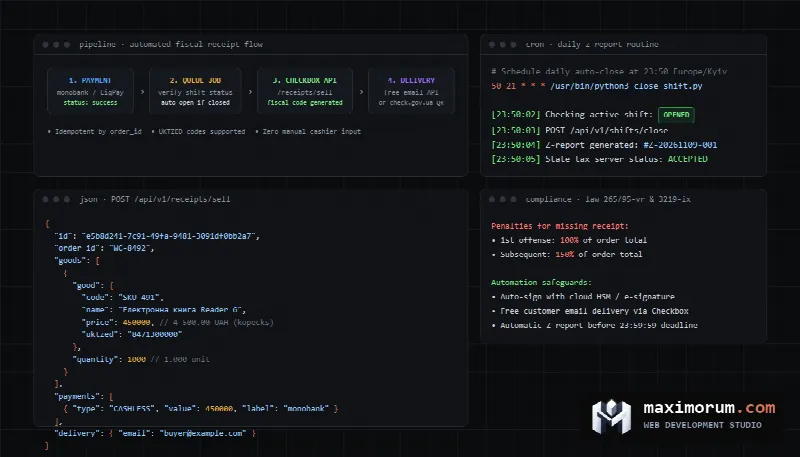
When an online store accepts digital payments via Stripe, PayPal, or local merchant gateways, managing tax compliance and issuing digital receipts becomes a complex operational bottleneck. Invoicing every buyer manually through a dashboard creates severe delays and increases the risk of financial penalties. Attempting to generate receipts synchronously during the checkout process slows down server response times, leading to abandoned carts. Below is a complete technical guide to building an asynchronous digital receipt and automated tax pipeline that processes orders, verifies tax calculations, delivers digital receipts to customers, and keeps bookkeeping audit-ready.
Compliance requirements for digital receipts and sales tax
E-commerce businesses operating internationally face strict fiscal compliance and tax reporting regulations. Depending on the jurisdiction of both the merchant and the customer, tax requirements vary significantly:
- In the European Union, VAT rules require accurate determination of customer location and application of country-specific tax rates for digital goods and physical items.
- In the United States, economic nexus laws obligate online retailers to calculate state and local sales taxes once certain revenue or transaction thresholds are reached.
- In domestic markets such as the UK or Eastern European countries, merchants must issue legal fiscal receipts with detailed line items, seller tax registration numbers, and unique timestamps.
Delivering a digital receipt is not merely an optional courtesy. It serves as legal proof of transaction. Failure to generate and archive compliant transaction documents exposes businesses to severe audit penalties, disputed charges, and platform account suspensions. Providing customers with instant access to verifiable digital receipts drastically reduces payment disputes and chargebacks.
Why synchronous receipt generation hurts checkout conversion
Many development teams implement receipt generation directly inside the web request lifecycle. When a customer clicks the pay button, the backend processes payment, calls third-party tax calculation APIs, creates an invoice PDF, sends an email, and only then redirects the buyer to the thank-you page. This architecture creates significant friction.
According to research by the Baymard Institute based on 50 e-commerce studies, the average cart abandonment rate stands at 70.22%. Furthermore, 17% of shoppers abandon orders specifically because of checkout technical errors or excessive latency. Third-party fiscal APIs and tax engines frequently experience response latencies between 500 milliseconds and 4 seconds. If an external service experiences intermittent downtime or rate limiting, the customer experiences a broken checkout session, leading to abandoned transactions and double-charge attempts.
A resilient system decouples the checkout payment flow from post-payment fiscal actions. The checkout flow confirms payment and immediately redirects the customer to a confirmation view. All heavy lifting, such as tax invoice creation and receipt email delivery, is dispatched to a background worker queue.
The asynchronous webhook architecture
Modern e-commerce platforms rely on event-driven architectures powered by webhooks. Rather than polling payment processors or blocking client threads, the system listens for signed event payloads sent from server to server. The workflow consists of four distinct stages:
- Payment gateway notification. When a customer completes checkout, the payment provider dispatches an HTTP POST webhook (such as Stripe
payment_intent.succeededorinvoice.paid) to your secure endpoint. - Signature verification and idempotency check. The application verifies the cryptographic signature header of the webhook payload, confirms the payload authenticity, and records the event ID in an idempotency cache.
- Asynchronous job dispatch. The webhook handler responds with an immediate HTTP 200 OK status to the payment provider. Simultaneously, it pushes an order fiscalization job onto a background queue system (such as Redis queues, RabbitMQ, or Laravel Queue).
- Receipt generation and customer notification. The queue worker processes the job, computes tax line items via official tax APIs (such as Stripe Tax documentation), generates the digital receipt URL, updates the store database, and transmits the receipt to the buyer via email or messaging channel.
If an external tax API or transactional email provider encounters a temporary failure, the background queue worker automatically retries the task using exponential backoff without impacting the customer experience on your website.
Tax calculation and automated invoice creation
Calculating accurate sales tax across multi-regional catalogs requires dynamic address validation and product tax codes. Platforms such as Stripe Tax provide automated calculation endpoints directly within payment sessions. For custom platforms built on Laravel or Node.js, tax calculations are integrated through REST APIs:
curl -X POST "https://api.stripe.com/v1/tax/calculations" \
  -u "sk_live_secret_key:" \
  -d "currency"="usd" \
  -d "customer_details[address][country]"="US" \
  -d "customer_details[address][state]"="CA" \
  -d "customer_details[address][postal_code]"="94103" \
  -d "customer_details[address_source]"="shipping" \
  -d "line_items[0][amount]"=4500 \
  -d "line_items[0][reference]"="SKU-491" \
  -d "line_items[0][tax_code]"="txcd_99999999"
Notice that all monetary amounts in financial APIs are formatted as integers in the lowest currency unit (cents). Storing and transmitting prices as integer values eliminates floating-point rounding discrepancies that cause tax balancing failures in financial statements.
Once payment succeeds, generating a finalized, hosted tax invoice allows customers to view and download their receipt at any time without burdening your web server (Stripe Invoicing documentation):
curl -X POST "https://api.stripe.com/v1/invoices" \
  -u "sk_live_secret_key:" \
  -d "customer"="cus_9s8df723kj" \
  -d "auto_advance"="true" \
  -d "collection_method"="charge_automatically"
Idempotency and preventing duplicate receipts
Payment webhooks are delivered with at-least-once delivery guarantees. Network timeouts or transient server drops often cause payment gateways to retry sending the same webhook event multiple times. If your application processes each webhook without deduplication, it may generate duplicate invoices, double-count taxes, and email multiple receipts to the customer.
To ensure strict idempotency, implement unique database constraints on order identifiers and fiscal reference IDs. Before executing fiscal API requests, the background worker checks whether a fiscal transaction record already exists for the given order ID. We covered webhook idempotency patterns in detail in our engineering guide on handling idempotent payment webhooks.
Production-ready Python worker for digital receipts
The following Python script illustrates a production-ready queue worker component. It processes successful payment events, verifies idempotency, issues a structured digital receipt, and triggers customer delivery:
import json
import logging
import uuid
import urllib.request as request
import urllib.error as error

logging.basicConfig(level=logging.INFO)
logger = logging.getLogger("FiscalWorker")

class DigitalReceiptProcessor:
    def __init__(self, api_key: str, endpoint: str):
        self.api_key = api_key
        self.endpoint = endpoint
        self.processed_cache = set()

    def process_order_event(self, event_id: str, order_id: str, payload: dict) -> dict:
        if event_id in self.processed_cache:
            logger.info("Event %s already processed. Skipping duplicate.", event_id)
            return {"status": "skipped", "reason": "idempotent_duplicate"}

        receipt_id = str(uuid.uuid4())
        logger.info("Generating digital receipt %s for order %s", receipt_id, order_id)

        items = []
        for line in payload.get("items", []):
            items.append({
                "sku": line["sku"],
                "name": line["title"],
                "unit_cents": line["unit_price_cents"],
                "quantity": line["quantity"],
                "tax_rate_basis": line.get("tax_rate", 0)
            })

        receipt_body = {
            "receipt_id": receipt_id,
            "order_id": order_id,
            "currency": payload.get("currency", "USD"),
            "total_cents": payload["total_cents"],
            "tax_cents": payload.get("tax_cents", 0),
            "customer_email": payload["customer_email"],
            "line_items": items,
            "payment_method": payload.get("payment_method", "card")
        }

        req = request.Request(
            f"{self.endpoint}/receipts",
            data=json.dumps(receipt_body).encode("utf-8"),
            headers={
                "Content-Type": "application/json",
                "Authorization": f"Bearer {self.api_key}",
                "X-Idempotency-Key": order_id
            },
            method="POST"
        )

        try:
            with request.urlopen(req, timeout=15) as res:
                response_data = json.loads(res.read().decode("utf-8"))
                self.processed_cache.add(event_id)
                logger.info("Receipt successfully created: %s", response_data.get("receipt_url"))
                return response_data
        except error.HTTPError as err:
            logger.error("Fiscal API failed: %s %s", err.code, err.read().decode("utf-8"))
            raise RuntimeError(f"Fiscal API error code {err.code}")
This architecture decouples receipt logic from the public checkout front-end. If your team requires custom e-commerce modules or webhook pipelines, we build automated workflow solutions that connect store platforms with financial systems. Custom module development in our pricing starts from $80, and complete business workflow automation on n8n starts from $500.
Synchronous vs asynchronous receipt architectures
| Metric | Synchronous Receipt Generation | Asynchronous Queue Processing |
|---|---|---|
| Checkout page latency | Increases by 1.5 to 5 seconds | Zero overhead (instant checkout confirmation) |
| Impact of external API outage | Checkout breaks, customer sees 504 Gateway Error | Customer sees success, worker retries in background |
| Duplicate transaction risk | High if customer clicks refresh during timeout | Prevented through idempotency keys and locks |
| System scalability | Server threads blocked during peak sales events | Workers scale independently to match transaction volume |
| Customer receipt delivery | Delayed until synchronous connection completes | Dispatched via reliable transactional email queue |
| Audit log completeness | Missing records when network connections drop | Full audit log with persistent job status history |
Handling refunds and credit adjustments
When an order is canceled or returned, financial regulations prohibit simply deleting the original sales record. Proper bookkeeping requires generating a corresponding credit note or refund receipt that mirrors the original line items and tax amounts.
Automate this flow by subscribing to refund webhooks (such as charge.refunded). The worker retrieves the original receipt reference, issues a negative-balance credit invoice, and adjusts the sales tax liability ledger. This ensures that monthly tax reports accurately reflect gross revenue minus verified refunds.
Common implementation mistakes
- Blocking webhook responses. Holding webhook HTTP connections open while generating PDF documents or calling multiple external endpoints causes webhook delivery timeouts. Always return a 200 response immediately after queuing the payload.
- Fractional rounding errors with sales tax. Applying percentage tax calculations to individual unit prices without a consistent rounding mode creates penny discrepancies between total tax and line item tax sums. Establish uniform rounding rules across your catalog.
- Lack of persistent retry policies. If an external invoicing service undergoes maintenance, failing jobs without exponential retry will cause unissued receipts. Implement a retry strategy with a dead-letter queue for inspection.
- Neglecting transaction reconciliation. Even well-designed automated systems occasionally experience dropped messages. Run an automated end-of-day script that reconciles payment processor settlement logs against generated receipts to identify missing records. For deeper insights into analyzing funnel losses, read our guide on measuring WooCommerce checkout abandonment.
Frequently asked questions
What is the difference between a payment notification and a digital fiscal receipt?
A payment notification from a processor confirms that funds were transferred. A digital fiscal receipt is a legal accounting document that lists seller business credentials, tax identification numbers, itemized products, applied tax rates, and unique sequence numbers required by tax authorities.
How should digital receipts be stored for regulatory audits?
Store digital receipt records in an immutable database archive or object storage (such as Amazon S3 with Object Lock) alongside cryptographic hashes. Maintain records for at least five to seven years depending on local corporate tax regulations.
Can digital receipts be sent via messaging apps instead of email?
Yes. Providing a link to a secure hosted receipt or sending an instant PDF via messaging channels is compliant provided the buyer consented to digital delivery and the document contains all required fiscal attributes.
How does asynchronous receipt generation handle failed jobs?
Background workers use dead-letter queues. If an external API is unavailable after five retry attempts, the job moves to a monitoring queue and alerts engineering staff, while the customer purchase remains confirmed and intact.
Automate digital receipts for your e-commerce platform
We build automated payment workflows, custom module integrations, and tax receipt pipelines for WooCommerce, OpenCart, and custom Laravel platforms. We ensure your transactions remain compliant and reliable while keeping checkout fast and friction-free. Learn more about our technical store implementations in the online stores service section.
Explore transparent starting rates on our pricing page. To review your e-commerce checkout and integration requirements, submit a request through our contact form or connect with us directly on Telegram.