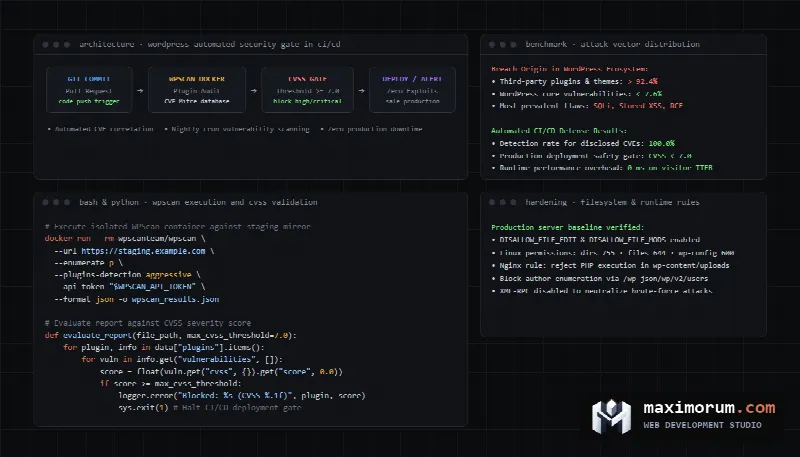
When WordPress websites suffer security breaches, stakeholders frequently assume that attackers discovered an unpatched zero-day flaw in WordPress core. Real-world incident data demonstrates a different reality. According to the international vulnerability catalog maintained by CVE Mitre and enterprise security intelligence, over 90% of successful intrusions originate in third-party plugins and themes. WordPress core updates automatically, yet dozens of community extensions operate for months without code audits or maintenance. A single vulnerable plugin can transform a corporate portal or e-commerce shop into a malware delivery vehicle, SEO spam farm, or credit card skimmer. Below is an engineering guide to auditing WordPress plugin vulnerabilities using the WPScan scanner, categorizing attack vectors under OWASP standards, and enforcing security verification gates within Git CI/CD pipelines before deployment.
Anatomy of third-party plugin vulnerabilities
The open-source WordPress repository contains tens of thousands of free and commercial plugins. Many are built by individual authors without formal code reviews. Based on the OWASP Top 10 classification, vulnerable plugins exhibit four primary security flaws:
- SQL Injections (SQLi). Developers append unescaped user inputs directly into database queries instead of wrapping parameters via $wpdb->prepare(). Attackers submit crafted SQL payloads to dump the entire wp_users table, exfiltrating administrator password hashes.
- Unauthenticated Stored Cross-Site Scripting (Stored XSS). Occurs when plugins accept feedback or comments without strict input sanitization and output escaping. Malicious JavaScript writes to the database. When an administrator inspects records in wp-admin, the script executes silently, generating a rogue super-administrator account.
- Broken Access Control and Privilege Escalation. Unprotected AJAX endpoints registered via wp_ajax_nopriv_* or unauthenticated REST API routes. When developers omit current_user_can() checks and bypass nonce verification, unauthenticated visitors submit payloads that modify core website settings.
- Arbitrary File Upload. File upload forms lacking MIME validation and strict extension whitelists permit users to upload .phtml or .php5 files. Once written to disk, attackers request the file directly, executing remote commands on the underlying web server.
How the WPScan scanner functions
To identify known security flaws across WordPress deployments, security engineers use the open-source WPScan scanner. Maintained by dedicated vulnerability researchers, WPScan correlates software signatures against the extensive WordPress Vulnerability Database.
The scanner examines target environments through four sequential phases:
- Fingerprints WordPress core releases by parsing meta generators, script version parameters, and stylesheet hash values.
- Discovers installed plugins by checking static readme.txt files, analyzing asset URLs in DOM structures, and parsing HTTP response headers.
- Cross-references plugin slugs and version strings against published CVE records.
- Compiles a structured report detailing discovered vulnerabilities, associated CVE identifiers, exploit proof-of-concepts, and target versions containing official security patches.
Executing scans via CLI and Docker containers
The cleanest approach for running WPScan involves using the official Docker container. This eliminates local Ruby runtime dependencies and provides an isolated execution environment. To pull vulnerability records, engineers supply an API token issued by the WPScan platform.
The command below performs an aggressive enumeration of installed plugins, saving the full audit payload as a structured JSON artifact:
docker run --rm -it wpscanteam/wpscan \
  --url https://staging.example.com \
  --enumerate p \
  --plugins-detection aggressive \
  --api-token "YOUR_WPSCAN_API_TOKEN" \
  --format json \
  --output /tmp/wpscan_report.json
The aggressive detection flag tests for known plugin paths against a dictionary of thousands of extensions. This uncovers dormant or disabled plugins that reside in the wp-content/plugins directory without rendering public frontend assets. Attackers frequently exploit inactive plugins because their PHP files remain directly accessible via web browsers.
Automating security gates in CI/CD pipelines
Manual quarterly audits fail to prevent intrusions because new vulnerability disclosures occur weekly. Production workflows require automated security scanning integrated directly into Git pull requests and scheduled nightly jobs.
The following GitHub Actions workflow launches against staging environments, executes WPScan via Docker, and routes the report to a custom Python evaluator:
name: Security Audit WPScan

on:
  push:
    branches: [ main, staging ]
  schedule:
    - cron: '0 3 * * *'

jobs:
  wpscan:
    runs-on: ubuntu-latest
    steps:
      - name: Checkout repository
        uses: actions/checkout@v4

      - name: Run WPScan Docker
        run: |
          docker run --rm \
            -v ${{ github.workspace }}:/output \
            wpscanteam/wpscan \
            --url https://staging.example.com \
            --enumerate p \
            --plugins-detection aggressive \
            --api-token ${{ secrets.WPSCAN_API_TOKEN }} \
            --format json \
            --output /output/wpscan_results.json || true

      - name: Analyze Vulnerabilities with Python
        run: |
          python scripts/analyze_wpscan.py wpscan_results.json
Appended with a trailing true statement, the Docker step preserves the output artifact on disk even when WPScan returns a non-zero exit code upon encountering security warnings.
Evaluating reports using CVSS risk thresholds
Enterprise deployments must filter informational notices from actual threats. The Python script below parses JSON output, extracts Common Vulnerability Scoring System (CVSS) scores, and halts deployment pipelines whenever high-severity issues emerge:
import json
import sys
import logging

logging.basicConfig(level=logging.INFO)
logger = logging.getLogger("WPScanValidator")

def evaluate_report(file_path: str, max_cvss_threshold: float = 7.0):
    with open(file_path, "r", encoding="utf-8") as f:
        data = json.load(f)

    plugins = data.get("plugins", {})
    critical_findings = []

    for slug, info in plugins.items():
        plugin_name = info.get("name", slug)
        vulnerabilities = info.get("vulnerabilities", [])

        for vuln in vulnerabilities:
            title = vuln.get("title", "Unknown issue")
            cvss = vuln.get("cvss", {})
            score = float(cvss.get("score", 0.0)) if cvss else 0.0

            logger.info("Found issue in %s: %s (CVSS: %.1f)", plugin_name, title, score)

            if score >= max_cvss_threshold:
                critical_findings.append({
                    "plugin": plugin_name,
                    "title": title,
                    "cvss": score,
                    "fixed_in": vuln.get("fixed_in", "No fix available"),
                })

    if critical_findings:
        logger.error("Security Gate Failed. Critical vulnerabilities found:")
        for item in critical_findings:
            logger.error("-> %s | CVSS: %.1f | Fixed in: %s", item["plugin"], item["cvss"], item["fixed_in"])
        sys.exit(1)

    logger.info("Security Gate Passed. No critical issues detected.")

if __name__ == "__main__":
    report_file = sys.argv[1] if len(sys.argv) > 1 else "wpscan_results.json"
    evaluate_report(report_file)
When any component displays a CVSS score of 7.0 or greater (classified as High or Critical severity), the script exits with code 1. The CI pipeline aborts release to production, preventing known exploits from going live. To review defensive coding standards, consult the official WordPress Plugin Security handbook.
Hardening filesystem permissions and server runtime
Automated scanning must be paired with filesystem and server-level hardening. Applying the following infrastructure controls significantly reduces attack surfaces:
- Disable in-dashboard file editing. Define
define('DISALLOW_FILE_EDIT', true);anddefine('DISALLOW_FILE_MODS', true);inside wp-config.php. Even if an attacker compromises an administrator credential, these constants prevent theme code editing and unauthorized zip uploads. - Enforce strict Linux permission hierarchies. Directories should maintain 755 permissions and files should maintain 644 permissions. The wp-config.php file must use 600 or 400 permissions, owned by the web server user without group write privileges.
- Prevent PHP execution inside uploads directories. The wp-content/uploads path must serve media assets only. Nginx server blocks should reject requests terminating in .php within uploads directories, neutralizing uploaded backdoors.
- Disable REST API user enumeration. By default, /wp-json/wp/v2/users exposes author login handles. Restrict this route to authenticated administrators.
For stores operating WooCommerce, strict security must preserve checkout performance. To diagnose conversion friction during payment, review our guide on measuring WooCommerce checkout funnel drop-offs.
Comparison of security audit methodologies
The table below summarizes common approaches for auditing and defending WordPress platforms against external exploits:
| Audit Methodology | Execution Frequency | Server Overhead | Zero-Day Discovery | CVE Accuracy | Impact on Page Speed |
|---|---|---|---|---|---|
| Runtime Security Plugins (Wordfence, iThemes) | Continuous in PHP runtime | High (slows execution) | High (signature matching) | Moderate | Adds 100 to 300 ms to TTFB |
| External Scheduled WPScan | Daily via cron | Low (isolated test) | Full CVE database | Exact | Zero visitor impact |
| Static Code Analysis in CI/CD | On every Git commit | Zero for production | Flags code flaws | Preliminary | Zero |
| Combined WAF and CI/CD Auditing | Continuous edge protection | Minimal (cloud proxy) | Maximum security | Exact alignment | Zero through edge caching |
Common security administration pitfalls
- Retaining deactivated plugins on production servers. Deactivated plugins remain accessible via direct URL calls, allowing attackers to exploit unpatched PHP scripts.
- Running abandoned plugins. Plugins with no updates for over twelve months lack testing on modern PHP runtimes and harbor disclosed CVEs that remain unpatched.
- Manual server configuration changes. Security parameters must be versioned in Git infrastructure repositories rather than edited manually through web hosting panels.
- Storing backups on the production web server. Backup archives placed within web directories are readable by scanners and are wiped or encrypted by ransomware during breaches. Backups must transfer to off-site S3 object storage immediately.
Frequently asked questions
Are plugins in the official WordPress directory safe?
The official directory reviews submissions initially, but subsequent updates may introduce security defects. When severe vulnerabilities surface, repository moderators delist the plugin until the author releases a patch.
How should teams respond if an unpatched vulnerability is discovered?
If an active plugin has an unpatched exploit and the author has abandoned development, replace it immediately. Temporary protection can be established by configuring custom WAF rules in Cloudflare or ModSecurity to block targeted request parameters.
How frequently does the WPScan vulnerability database update?
The database refreshes daily as security researchers submit disclosed vulnerabilities and CVE records. Maintaining an active API token ensures continuous access to recent intelligence.
Can WPScan scans cause performance degradation on live stores?
Under default settings, WPScan generates modest HTTP request volume. To avoid production load, run scans against staging mirrors or during off-peak night maintenance windows.
Protect your WordPress platform against cyber threats
We perform technical security audits, remediate compromised installations, and build automated deployment pipelines for WordPress and WooCommerce platforms. Keep your web properties secure and safeguard customer data. Learn more about our engineering standards in our corporate website development services and online store creation section, or explore workflow integrations in our business automation services.
Review transparent rates on our development pricing page. Our options feature corporate websites on WordPress from $500, online stores from $1,000, monthly website maintenance from $250, technical SEO audits from $200, custom module development from $80, and n8n workflow automation from $500. To audit your website security, submit an inquiry through our contact form or contact us directly on Telegram.