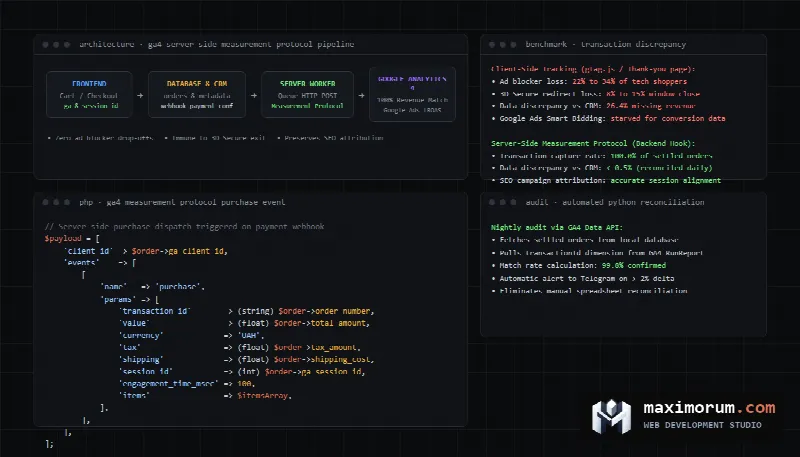
When e-commerce business owners open the monetization reports in Google Analytics 4 and compare recorded revenue against raw transactions in their CRM or database, they invariably discover an alarming discrepancy. Order counts in GA4 rarely match physical bank settlements. In most online stores, the gap ranges between 15% and 35%. Marketing leads blame attribution models, web developers inspect tracking tags, while advertising budgets suffer. When Google Ads operates on truncated revenue signals, smart bidding algorithms make erratic bidding choices. According to independent e-commerce research by the Baymard Institute, average checkout abandonment sits at 70.22%, and client-side tracking gaps make it impossible to isolate real friction from telemetry loss. Below is a complete technical guide explaining why browser-based tracking fails, how to deploy server-side Measurement Protocol tracking in GA4, and how to automate transaction reconciliation with backend orders.
Why browser tracking drops one in every four orders
The standard convention of recording e-commerce transactions relies on firing a client-side purchase event when a user visits the order confirmation page. In modern browsing environments, this mechanism suffers from systematic failure modes:
- Ad blockers and privacy browser shields. Browser extensions like uBlock Origin and AdGuard, alongside native shields in Brave and Vivaldi, block outgoing network requests to google-analytics.com. In consumer electronics, gaming, and B2B software verticals, technical audiences use ad blockers at rates exceeding 30%. For these users, client-side purchase events never reach Google servers.
- Bank payment gateways and 3D Secure redirects. When shoppers select external payment providers like Stripe, PayPal, or localized bank redirects, the web store redirects them to external banking domains. Upon entering SMS codes or confirming push notifications, the bank displays a confirmation splash screen. Most mobile shoppers see the confirmed debit and close their browser window without clicking the return link. The thank-you page never renders, and the JavaScript tracker never executes.
- WebKit Intelligent Tracking Prevention on Apple devices. Apple ITP rules reduce the lifespan of client-side cookies set via JavaScript to 7 days or 24 hours (WebKit ITP technical documentation). When a shopper lands via organic search on Monday and returns to complete checkout the following week, GA4 attributes the transaction to Direct traffic, erasing SEO attribution.
- Mobile network drops during checkout transitions. Cellular network handovers between cell towers and Wi-Fi networks terminate pending XMLHttpRequest and Fetch requests before completion.
How missing transactions damage Google Ads and organic SEO
Accepting a 20% data loss under the assumption that trends remain directional creates severe operational liabilities. Modern search engine marketing relies on algorithmic bidding. Google Ads Smart Bidding strategies like Target ROAS and Maximize Conversion Value calibrate bids using transaction values attributed to search terms.
When an e-commerce platform fails to transmit high-value conversion events, the bidding engine treats productive keywords as unprofitable. The algorithm systematically reduces bids on commercial search terms and reallocates capital toward low-intent queries. Concurrently, organic marketing teams struggle to justify budgets because revenue attributed to organic search appears artificially low. For architectural strategies on preserving search equity during technical replatforming, explore our technical guide on e-commerce replatforming without losing rankings.
Architecture of server-side conversion tracking
The only reliable method to achieve accurate transaction tracking is transferring the purchase event trigger from untrusted client browsers to the store backend. The official Google Analytics Measurement Protocol provides a direct HTTP API for dispatching events from application servers.
A server-side tracking pipeline operates across four stages:
- Client session capture on the storefront. When a visitor views checkout pages, the application reads the unique client_id from the _ga cookie alongside the active session_id.
- Attribution persistence in database records. The application writes these parameters to hidden fields and saves them directly into order records upon cart submission.
- Server-side payment verification. The backend listens for authoritative payment webhooks dispatched by the bank or gateway, decoupling tracking from browser rendering.
- Asynchronous API dispatch. A background queue worker transmits an HTTP POST request containing the purchase payload to the Google Analytics Measurement Protocol endpoint. The transaction registers even if the buyer uninstalled their browser immediately after payment.
Capturing GA4 attribution parameters on the storefront
To ensure server-side purchases attribute correctly to traffic channels, campaigns, and landing pages, the event payload must include the original client_id and session_id established by the user session. The lightweight JavaScript utility below extracts these identifiers and injects them into checkout inputs:
function getCookie(name) {
    const value = `; ${document.cookie}`;
    const parts = value.split(`; ${name}=`);
    if (parts.length === 2) return parts.pop().split(';').shift();
    return null;
}

function extractGaParameters(measurementId) {
    const gaCookie = getCookie('_ga');
    let clientId = null;
    if (gaCookie) {
        const parts = gaCookie.split('.');
        if (parts.length >= 4) {
            clientId = `${parts[2]}.${parts[3]}`;
        }
    }

    const containerSuffix = measurementId.replace('G-', '');
    const sessionCookie = getCookie(`_ga_${containerSuffix}`);
    let sessionId = null;
    if (sessionCookie) {
        const parts = sessionCookie.split('.');
        if (parts.length >= 3) {
            sessionId = parts[2];
        }
    }

    return { clientId, sessionId };
}

document.addEventListener('DOMContentLoaded', () => {
    const measurementId = 'G-XXXXXXXXXX';
    const { clientId, sessionId } = extractGaParameters(measurementId);

    const clientInput = document.querySelector('input[name="ga_client_id"]');
    const sessionInput = document.querySelector('input[name="ga_session_id"]');

    if (clientInput && clientId) clientInput.value = clientId;
    if (sessionInput && sessionId) sessionInput.value = sessionId;
});
This snippet runs independently of external tag libraries. In cases where users deploy strict browser blockers, the backend generates an internal pseudo-anonymous identifier, ensuring transaction revenue registers within aggregate financial summaries.
Backend purchase dispatch in PHP Laravel
Transmitting events requires creating an API Secret in the Google Analytics admin panel under Data Streams > Web Stream > Measurement Protocol API secrets. Requests target the endpoint https://www.google-analytics.com/mp/collect.
The PHP service below formats transaction payloads, builds item catalogs, handles sales tax and shipping parameters, and transmits verified orders to GA4:
<?php

namespace App\Services;

use App\Models\Order;
use Illuminate\Support\Facades\Http;
use Illuminate\Support\Facades\Log;

class GA4MeasurementService
{
    private string $measurementId;
    private string $apiSecret;
    private string $endpoint = 'https://www.google-analytics.com/mp/collect';

    public function __construct()
    {
        $this->measurementId = config('services.ga4.measurement_id');
        $this->apiSecret = config('services.ga4.api_secret');
    }

    public function trackPurchase(Order $order): bool
    {
        if (empty($order->ga_client_id)) {
            $clientId = (string) $order->user_id ?: 'srv.' . $order->id . '.' . time();
        } else {
            $clientId = $order->ga_client_id;
        }

        $items = $order->items->map(function ($item, $index) {
            return [
                'item_id' => (string) $item->product_sku,
                'item_name' => $item->product_name,
                'item_category' => $item->category_name ?? 'General',
                'price' => (float) $item->price,
                'quantity' => (int) $item->quantity,
                'index' => $index + 1,
            ];
        })->toArray();

        $eventParams = [
            'transaction_id' => (string) $order->order_number,
            'value' => (float) $order->total_amount,
            'currency' => 'USD',
            'tax' => (float) $order->tax_amount,
            'shipping' => (float) $order->shipping_cost,
            'items' => $items,
        ];

        if (! empty($order->ga_session_id)) {
            $eventParams['session_id'] = (int) $order->ga_session_id;
            $eventParams['engagement_time_msec'] = 100;
        }

        $payload = [
            'client_id' => $clientId,
            'events' => [
                [
                    'name' => 'purchase',
                    'params' => $eventParams,
                ],
            ],
        ];

        $url = "{$this->endpoint}?measurement_id={$this->measurementId}&api_secret={$this->apiSecret}";

        $response = Http::timeout(10)
            ->retry(3, 1000)
            ->post($url, $payload);

        if ($response->successful()) {
            $order->update(['ga_synced_at' => now()]);
            return true;
        }

        Log::error('GA4 Measurement Protocol transmission error', [
            'order_id' => $order->id,
            'status' => $response->status(),
            'body' => $response->body(),
        ]);

        return false;
    }
}
The engagement_time_msec attribute is required when sending session_id. Without an engagement duration, Google Analytics marks events as background pings and excludes them from real-time conversion widgets. For checkout drop-off analysis techniques, consult our article on measuring WooCommerce checkout funnel drop-offs.
Validating event payloads via debug endpoints
The production Measurement Protocol endpoint responds with HTTP 204 No Content for all incoming payloads, regardless of syntax errors. If a parameter name contains typographical mistakes or missing currency codes, Google servers drop the payload silently.
During development and deployment, engineers must test payloads against the dedicated debug endpoint https://www.google-analytics.com/debug/mp/collect. The debug server parses JSON payloads and returns structured validation messages:
curl -X POST "https://www.google-analytics.com/debug/mp/collect?measurement_id=G-XXXXXXXXXX&api_secret=abc123secret" \
  -H "Content-Type: application/json" \
  -d '{
    "client_id": "1849201948.1731402910",
    "events": [
      {
        "name": "purchase",
        "params": {
          "transaction_id": "ORD-2026-9481",
          "value": 145.00,
          "currency": "USD",
          "items": [
            {
              "item_id": "SKU-992",
              "item_name": "Mechanical Keyboard",
              "price": 145.00,
              "quantity": 1
            }
          ]
        }
      }
    ]
  }'
When the payload conforms to specification, the debug endpoint returns {"validationMessages": []}. Once this response is confirmed, traffic is switched to the production collector.
Automating daily conversion reconciliation in Python
Maintaining high data integrity requires automated auditing. A nightly Python script executing via cron queries the database for settled transactions and compares them against events captured in GA4 via the Google Analytics Data API:
import datetime
import json
import logging
from google.analytics.data_v1beta import BetaAnalyticsDataClient
from google.analytics.data_v1beta.types import (
    DateRange,
    Dimension,
    Metric,
    RunReportRequest,
)

logging.basicConfig(level=logging.INFO)
logger = logging.getLogger("GA4Reconcile")

def fetch_ga4_transactions(property_id: str, date_str: str) -> set:
    client = BetaAnalyticsDataClient()
    request = RunReportRequest(
        property=f"properties/{property_id}",
        dimensions=[Dimension(name="transactionId")],
        metrics=[Metric(name="purchaseRevenue")],
        date_ranges=[DateRange(start_date=date_str, end_date=date_str)],
    )
    response = client.run_report(request)
    transactions = set()
    for row in response.rows:
        transactions.add(row.dimension_values[0].value)
    return transactions

def reconcile(yesterday_orders: list, ga4_transactions: set):
    db_ids = {order["order_number"] for order in yesterday_orders}
    matched = db_ids.intersection(ga4_transactions)
    missing = db_ids.difference(ga4_transactions)

    match_rate = (len(matched) / len(db_ids)) * 100 if db_ids else 100.0

    logger.info("Total CRM orders: %d", len(db_ids))
    logger.info("Matched in GA4: %d (%.2f%%)", len(matched), match_rate)
    logger.info("Missing in GA4: %d", len(missing))

    if missing:
        logger.warning("Unmatched IDs: %s", list(missing)[:10])

    return {
        "match_rate": match_rate,
        "missing_count": len(missing),
        "missing_ids": list(missing),
    }
If reconciliation identifies an omission rate above 2%, the script triggers an alert to engineering channels via an automated n8n webhook workflow.
Comparison of e-commerce conversion tracking methods
Selecting an analytics tracking approach requires balancing accuracy, implementation complexity, and server operating costs. The table below outlines trade-offs across common architectures:
| Tracking Architecture | Ad Blocker Resistance | Gateway Drop-off Resistance | Organic SEO Attribution | Setup Complexity | Hosting Infrastructure Cost |
|---|---|---|---|---|---|
| Client-side gtag.js | Zero (loses 20-30%) | Low (loses redirect orders) | Vulnerable to Apple ITP | Low | Free |
| Server-Side GTM (sGTM Container) | High (custom subdomain) | Moderate (requires visit) | High (HTTP-only cookies) | High | $20 to $100 monthly |
| Direct Measurement Protocol | Total (100% orders captured) | Total (triggered via webhook) | High with session_id | Moderate (backend code) | Zero additional hosting cost |
| Hybrid Client and Server Deduplication | Total | Total | Maximum precision | High | Minimal |
For container deployment patterns, consult the official guide on Server-side Google Tag Manager.
Common deployment pitfalls
- Transmitting events without session_id. Omitting the session identifier causes GA4 to record revenue while classifying the source as Unassigned or Direct, breaking campaign attribution.
- Duplicate purchase events. When deploying hybrid tracking with both browser and server triggers, both payloads must transmit matching transaction_id values. GA4 deduplicates identical transaction IDs received within a 48-hour window.
- Mismatched currency values. Failing to transmit an explicit currency parameter causes Google Analytics to convert amounts using default property settings, corrupting accounting reports.
- Synchronous HTTP dispatch on checkout. Network calls to external APIs must run inside asynchronous worker queues. Blocking user-facing PHP workers introduces checkout latency and cart abandonment.
Frequently asked questions
Does server-side tracking replace client-side add-to-cart events?
No. Early-stage funnel interactions like product views and cart additions remain suited for browser tags due to implementation simplicity. Server-side tracking is prioritized for business-critical milestones like purchase and qualified lead submission.
How can marketers verify session attribution quality?
Inspect GA4 conversion paths and calculate the percentage of revenue attributed to the Unassigned channel group. When session parameters transfer correctly, Unassigned transactions remain below 4%.
Does server-side tracking require cookie consent compliance?
Yes. Server-side data processing remains subject to data privacy regulations. When users decline analytical tracking, backends must strip identifying markers or halt external transmission.
What is the typical timeframe for deploying Measurement Protocol tracking?
Standard e-commerce integrations on Laravel, WooCommerce, or OpenCart take between 1 and 3 working days, including debug verification and test transaction reconciliation.
Deploy accurate conversion tracking for your store
We audit digital analytics foundations and implement server-side tracking pipelines for online stores and digital platforms. Ensure your Google Analytics 4 accounts and paid media campaigns reflect actual revenue figures. Discover our development capabilities in our online store creation section, or explore automated workflow solutions in our business automation services.
Review transparent pricing on our development pricing page. Our options feature GA4 + Tag Manager setup from $290, technical SEO audits from $200, custom module development from $80, n8n automation flows from $500, and complete online store builds from $1,000. To review your analytics infrastructure, submit an inquiry through our contact form or contact us directly on Telegram.