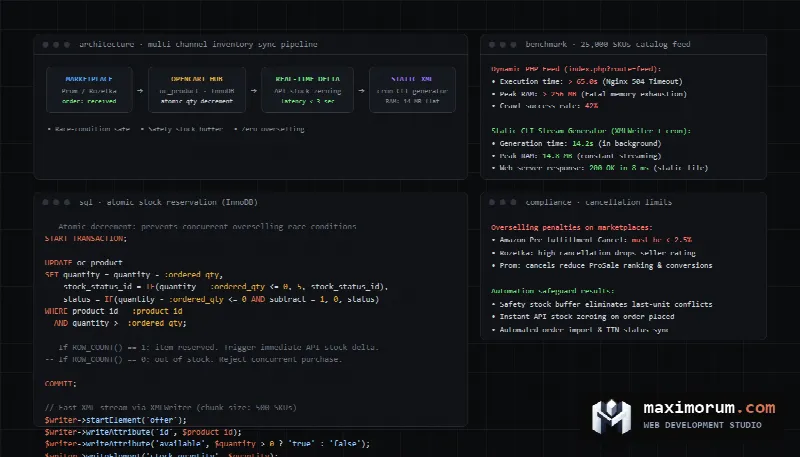
When an e-commerce brand scales beyond a single storefront by selling across Amazon, eBay, and Google Shopping, stock desynchronization becomes an existential operational threat. A shopper purchases the last unit of a product on your main website. Three minutes later, a customer buys that same unit on Amazon. Because the warehouse inventory did not update across platforms instantaneously, your operations team has to cancel the marketplace order. On major marketplaces, order cancellations trigger severe penalties. Amazon flags seller accounts with high Pre-fulfillment Cancel Rates, leading to suspended seller privileges and lost Buy Box visibility. Below is a complete technical guide to building an automated multi-channel inventory synchronization pipeline for OpenCart, generating high-volume product feeds without server timeouts, and eliminating overselling through real-time API stock deltas.
The financial and algorithmic cost of overselling
Marketplaces prioritize buyer experience above all else. When an order is canceled because an item was out of stock, algorithms penalize the merchant account. Amazon strictly enforces a Pre-fulfillment Cancel Rate threshold of less than 2.5% (Amazon Selling Partner API documentation). Exceeding this limit triggers account reviews, loss of merchant-fulfilled selling permissions, and removal from search ranking algorithms. On eBay, unfulfilled transactions degrade your seller level to Below Standard, resulting in higher final value fees and reduced listing exposure.
Independent research from the Baymard Institute reveals an average e-commerce cart abandonment rate of 70.22%. Furthermore, 17% of shoppers abandon purchases due to website technical glitches, inconsistent stock indicators, and unexpected friction. When a merchant advertises products that are not physically available, ad budgets are wasted, customer lifetime value evaporates, and merchant accounts face platform suspensions.
Why dynamic XML feed generation crashes OpenCart stores
Most commercial OpenCart feed modules attempt to generate product feeds on the fly. When a marketplace crawler requests a URL such as index.php?route=extension/feed/google_shopping, the web server executes a PHP process that attempts to query the entire database, build images, compute discounts, and render XML within a single HTTP request. This architecture creates severe bottlenecks:
- PHP memory exhaustion. Loading attributes, localized descriptions, options, and special prices for catalogs exceeding 5,000 or 30,000 SKUs exceeds standard PHP memory limits (memory_limit), resulting in a fatal 500 server error.
- Gateway timeouts. Marketplace bots enforce strict HTTP timeouts of 30 to 60 seconds. Heavy SQL joins cause Nginx to respond with 504 Gateway Timeout, leaving marketplace listings unrefreshed.
- Database connection contention. When crawlers from Google Merchant Center, Amazon, and price comparison sites hit dynamic feed URLs simultaneously, MySQL connection pools become saturated. Legitimate buyers browsing the storefront experience slow response times and abandon their carts.
- Sync lag. Marketplaces fetch product feeds on fixed schedules, often every 4 to 12 hours. If a product sells out at 10:00 AM, the marketplace continues selling it until the next scheduled feed crawl at 2:00 PM, creating a 4-hour window of guaranteed overselling.
Generating high-volume product feeds via background CLI workers
The standard solution for enterprise catalogs is pre-generating static XML files to disk using a scheduled command-line interface (CLI) worker. The worker bypasses web server timeouts, queries the database in small batches of 500 records, streams XML content directly to disk via XMLWriter, and saves the output as a static file.
Google Merchant Center defines strict requirements for product data feeds (Google Merchant Center product data specification). These include accurate availability values (in_stock, out_of_stock), price formatting, and unique product identifiers (GTIN, MPN, brand). Below is an optimized PHP generator component designed for OpenCart catalogs:
<?php
class StaticFeedGenerator {
    private $pdo;
    private $writer;

    public function __construct(PDO $pdo) {
        $this->pdo = $pdo;
        $this->writer = new XMLWriter();
    }

    public function build(string $targetFile): void {
        $this->writer->openURI($targetFile);
        $this->writer->startDocument('1.0', 'UTF-8');
        $this->writer->setIndent(true);

        $this->writer->startElement('rss');
        $this->writer->writeAttribute('version', '2.0');
        $this->writer->writeAttribute('xmlns:g', 'http://base.google.com/ns/1.0');

        $this->writer->startElement('channel');
        $this->writer->writeElement('title', 'OpenCart Store Catalog');
        $this->writer->writeElement('link', 'https://example.com');

        $this->streamProducts();

        $this->writer->endElement(); // channel
        $this->writer->endElement(); // rss
        $this->writer->endDocument();
    }

    private function streamProducts(): void {
        $chunkSize = 500;
        $offset = 0;

        while (true) {
            $stmt = $this->pdo->prepare(
                "SELECT p.product_id, p.model, p.sku, p.quantity, p.price, pd.name, p.status, m.name AS brand
                 FROM oc_product p
                 INNER JOIN oc_product_description pd ON (p.product_id = pd.product_id)
                 LEFT JOIN oc_manufacturer m ON (p.manufacturer_id = m.manufacturer_id)
                 WHERE pd.language_id = 1 AND p.status = 1
                 ORDER BY p.product_id ASC
                 LIMIT :limit OFFSET :offset"
            );
            $stmt->bindValue(':limit', $chunkSize, PDO::PARAM_INT);
            $stmt->bindValue(':offset', $offset, PDO::PARAM_INT);
            $stmt->execute();

            $batch = $stmt->fetchAll(PDO::FETCH_ASSOC);
            if (empty($batch)) {
                break;
            }

            foreach ($batch as $item) {
                $availability = ($item['quantity'] > 0) ? 'in_stock' : 'out_of_stock';

                $this->writer->startElement('item');
                $this->writer->writeElement('g:id', (string)$item['product_id']);
                $this->writer->writeElement('g:title', htmlspecialchars($item['name'], ENT_XML1));
                $this->writer->writeElement('g:link', 'https://example.com/product/' . $item['product_id']);
                $this->writer->writeElement('g:price', number_format($item['price'], 2, '.', '') . ' USD');
                $this->writer->writeElement('g:availability', $availability);
                $this->writer->writeElement('g:mpn', $item['model'] ?: $item['sku']);
                if ($item['brand']) {
                    $this->writer->writeElement('g:brand', htmlspecialchars($item['brand'], ENT_XML1));
                }
                $this->writer->endElement(); // item
            }

            $offset += $chunkSize;
        }
    }
}
By writing directly to disk, the process consumes less than 15 MB of RAM regardless of catalog size. Nginx serves the resulting static file via native kernel sendfile in microseconds, eliminating all timeout risks.
Real-time stock deltas via marketplace APIs
Scheduled feeds establish the catalog baseline, but fast-moving inventory requires real-time delta updates. Whenever an order status changes on your OpenCart storefront, a dedicated worker should dispatch an inventory update directly to marketplace APIs within seconds.
For eBay sellers, the eBay Inventory API (eBay Inventory API reference) provides the bulkUpdatePriceQuantity endpoint. This allows updating price and stock balances across up to 25 items in a single HTTP request:
curl -X POST "https://api.ebay.com/sell/inventory/v1/bulk_update_price_quantity" \
  -H "Authorization: Bearer v^1.1#i^1#r^0..." \
  -H "Content-Type: application/json" \
  -d '{
    "requests": [
      {
        "sku": "SKU-49102",
        "shipToLocationAvailability": {
          "quantity": 0
        }
      }
    ]
  }'
For Amazon, the Listings Items API within the SP-API framework allows merchants to submit partial JSON patch operations, modifying availability without uploading full flat files. Pushing immediate inventory zeroing ensures that once the last unit of an SKU is claimed on your web store, it becomes instantly unavailable on Amazon before competing shoppers can buy it.
Preventing race conditions in OpenCart database tables
Standard OpenCart database schemas often configure product tables using the legacy MyISAM storage engine (OpenCart GitHub repository). MyISAM locks entire tables during writes and does not support transactional isolation. If two checkout processes execute concurrently for an item with quantity 1, both read quantity 1 and both subtract 1, resulting in a negative balance and duplicate order confirmation.
To eliminate inventory race conditions, apply two architectural adjustments:
- Convert
oc_productandoc_product_option_valuetables to the InnoDB engine, enabling row-level locking and ACID transaction guarantees. - Use atomic conditional update statements that decrement stock only when sufficient units exist.
The following SQL statement decrements stock atomically without requiring an application-level read check:
UPDATE oc_product
SET quantity = quantity - :qty,
    stock_status_id = IF(quantity - :qty <= 0, 5, stock_status_id),
    status = IF(quantity - :qty <= 0 AND subtract = 1, 0, status)
WHERE product_id = :id
  AND quantity >= :qty;
If the affected rows count equals 1, the reservation succeeded. If the count equals 0, the product sold out milliseconds earlier. The system halts the checkout flow immediately, preventing an unfulfillable transaction. We explored webhook idempotency and state safety in our engineering article on handling idempotent payment webhooks.
Consolidating marketplace orders into OpenCart
Managing orders across individual seller portals causes human error and shipping delays. The ideal infrastructure pulls marketplace orders directly into the OpenCart database, creating corresponding customer records and decrements across your warehouse:
- Poll the marketplace order endpoints periodically or configure webhook listeners for new transactions.
- Map external marketplace SKU attributes to internal OpenCart product IDs.
- Insert new order records into
oc_orderandoc_order_productwith designated channel identifiers (such as Amazon or eBay). - Trigger atomic stock reservation across all remaining channels.
- Push fulfillment tracking details back to the marketplace once warehouse staff dispatch the parcel.
Production-ready Python synchronization worker
The following Python script illustrates a background worker component that consumes order events, manages stock adjustments, and updates external marketplace channels:
import json
import logging
import urllib.request as request
import urllib.error as error

logging.basicConfig(level=logging.INFO)
logger = logging.getLogger("MarketplaceSync")

class MarketplaceSyncWorker:
    def __init__(self, endpoint: str, auth_token: str):
        self.endpoint = endpoint
        self.auth_token = auth_token

    def _headers(self) -> dict:
        return {
            "Authorization": f"Bearer {self.auth_token}",
            "Content-Type": "application/json",
            "Accept": "application/json"
        }

    def push_stock_update(self, sku: str, new_quantity: int) -> bool:
        url = f"{self.endpoint}/inventory/update"
        payload = {
            "sku": sku,
            "quantity": max(0, new_quantity),
            "status": "in_stock" if new_quantity > 0 else "out_of_stock"
        }

        data = json.dumps(payload).encode("utf-8")
        req = request.Request(url, data=data, headers=self._headers(), method="POST")

        try:
            with request.urlopen(req, timeout=15) as res:
                response = json.loads(res.read().decode("utf-8"))
                logger.info("Stock sync successful for SKU %s: %s", sku, response)
                return True
        except error.HTTPError as err:
            logger.error("Stock sync failed for SKU %s: %s %s", sku, err.code, err.read().decode("utf-8"))
            return False
This worker integrates cleanly into message queues like RabbitMQ, Redis, or automated n8n workflows. If your store requires customized marketplace integrations or multi-warehouse routing, we build automated workflow solutions tailored to your architecture. Custom integration module development in our pricing starts from $80, and business workflow automation with n8n starts from $500.
Comparison of inventory synchronization methods
| Metric | Dynamic XML Feed | Static Scheduled Feed | Hybrid Feed with Real-Time API |
|---|---|---|---|
| Server memory footprint | Heavy (causes PHP fatal errors) | Low (constant 15 MB) | Low (constant 15 MB) |
| Stock sync frequency | 4 to 12 hours (crawler dependent) | 30 to 60 minutes | Under 5 seconds for delta stock changes |
| Risk of 504 Gateway Timeouts | High on catalogs above 5,000 SKUs | Zero (served via static file) | Zero (served via static file) |
| Overselling prevention | None during crawl intervals | Partial | Complete protection with atomic locks |
| Order consolidation | None (export only) | None (export only) | Full two-way synchronization |
The safety stock buffer strategy
To eliminate overselling risks on fast-turning inventory, enterprise retailers implement a safety stock buffer. Instead of transmitting raw inventory numbers, the export feed subtracts a predefined safety quantity.
If your warehouse holds 3 units of an item, the marketplace feed advertises 2 units. When stock drops to 1 unit, the feed reports 0 units to external marketplaces, reserving the final item exclusively for your primary storefront. This prevents race conditions during high-volume sales campaigns. Once new shipments arrive from suppliers, feeds update to reflect restored inventory levels.
Common integration mistakes
- Relying solely on scheduled XML feeds for inventory control. A 4-hour sync interval guarantees canceled orders during flash sales.
- Retaining MyISAM storage engines on e-commerce transaction tables. Table-level locking creates race conditions and order deadlocks.
- Failing to account for marketplace sales commissions in pricing feeds. Amazon and eBay charge category fees between 8% and 15%. Automated feeds must calculate channel-specific pricing rules.
- Ignoring automated digital invoicing. As transaction volume scales, issuing receipts manually becomes unsustainable. For automated tax compliance strategies, review our guide on automated digital receipts and tax invoicing. For deeper analysis of checkout drops, explore our engineering post on measuring checkout funnel drop-offs.
Frequently asked questions
Can OpenCart handle 50,000 products in an XML feed?
Yes, provided the feed is generated through a streaming CLI worker using XMLWriter rather than a dynamic PHP controller. Streaming writes data in chunks without exceeding server memory limits.
How does Amazon SP-API authenticate requests?
Amazon SP-API requires AWS Signature Version 4 signing along with a Login with Amazon (LWA) access token. Requests without valid AWS cryptographic headers are rejected.
What is the difference between GTIN, MPN, and SKU?
An SKU is an internal inventory code unique to your business. A GTIN (such as UPC or EAN) is a globally recognized barcode number. An MPN is the manufacturer part number used when GTIN barcodes are unavailable.
How should product variants be structured for marketplaces?
Marketplaces require distinct listings for each variant (size or color) mapped to a shared parent item group identifier, transmitting unique SKU stock numbers for each child option.
Automate marketplace synchronization for your store
We build high-performance feed generators, inventory management modules, and multi-channel order pipelines for OpenCart, WooCommerce, and custom Laravel platforms. Keep your inventory accurate across all sales channels and eliminate canceled orders. Explore our e-commerce engineering capabilities in the online stores service section.
Review transparent pricing on our project pricing page, including custom module development from $80 and complete online stores from $1,000. To discuss your marketplace integration requirements, submit a request through our contact form or contact us directly on Telegram.